 Home
PDF2Image ScreenShots
Articles
Products
Downloads
Home
PDF2Image ScreenShots
Articles
Products
Downloads
 |
Acrobat to BMP Converter Acrobat to BMP - Convert Acrobat files to BMP files (acrobat2bmp,acrobattobmp) |
BMP Format:
BMP is a standard format used by Windows to store device-independent and
application-independent images. The number of bits per pixel (1, 4, 8, 15, 24,
32, or 64) for a given BMP file is specified in a file header. BMP files with 24
bits per pixel are common.
BITMAP Structure
The BITMAP structure has the following form:
typedef struct tagBITMAP { /* bm */
int bmType;
int bmWidth;
int bmHeight;
int bmWidthBytes;
BYTE bmPlanes;
BYTE bmBitsPixel;
LPVOID bmBits;
} BITMAP;
The BITMAP structure defines the height, width, color format, and bit values of
a logical bitmap.
Members
bmType
Specifies the bitmap type. For logical bitmaps, this member must be 0.
bmWidth
Specifies the width of the bitmap in pixels. The width must be greater than 0.
bmHeight
Specifies the height of the bitmap in raster lines. The height must be greater
than 0.
bmWidthBytes
Specifies the number of bytes in each raster line. This value must be an even
number since the graphics device interface (GDI) assumes that the bit values of
a bitmap form an array of integer (2-byte) values. In other words, bmWidthBytes
* 8 must be the next multiple of 16 greater than or equal to the value obtained
when the bmWidth member is multiplied by the bmBitsPixel member.
bmPlanes
Specifies the number of color planes in the bitmap.
bmBitsPixel
Specifies the number of adjacent color bits on each plane needed to define a
pixel.
bmBits
Points to the location of the bit values for the bitmap. The bmBits member must
be a long pointer to an array of 1-byte values.
Comments
The currently used bitmap formats are monochrome and color. The monochrome
bitmap uses a 1-bit, 1-plane format. Each scan is a multiple of 16 bits.
Scans are organized as follows for a monochrome bitmap of height n:
Scan 0
Scan 1
.
.
.
Scan n-2
Scan n-1
The pixels on a monochrome device are either black or white. If the
corresponding bit in the bitmap is 1, the pixel is turned on (white). If the
corresponding bit in the bitmap is 0, the pixel is turned off (black).
All devices support bitmaps that have the RC_BITBLT bit set in the RASTERCAPS
index of the CDC::GetDeviceCaps member function.
Each device has its own unique color format. In order to transfer a bitmap from
one device to another, use theGetDIBits andSetDIBits Windows functions.
BITMAPFILEHEADER
The BITMAPFILEHEADER structure contains information about the type, size, and
layout of a file that contains a DIB.
typedef struct tagBITMAPFILEHEADER {
WORD bfType;
DWORD bfSize;
WORD bfReserved1;
WORD bfReserved2;
DWORD bfOffBits;
} BITMAPFILEHEADER, *PBITMAPFILEHEADER;
Members
bfType
Specifies the file type, must be BM.
bfSize
Specifies the size, in bytes, of the bitmap file.
bfReserved1
Reserved; must be zero.
bfReserved2
Reserved; must be zero.
bfOffBits
Specifies the offset, in bytes, from the BITMAPFILEHEADER structure to the
bitmap bits.
The BITMAPINFO structure has the following form:
The BITMAPINFO structure defines the dimensions and color information for a Windows device-independent bitmap (DIB).
Members
bmiHeader
Specifies a BITMAPINFOHEADER structure that contains information about the dimensions and color format of a device-independent bitmap.
bmiColors
Specifies an array of RGBQUAD or DWORD data types that define the colors in the bitmap.
Comments
A device-independent bitmap consists of two distinct parts: a BITMAPINFO structure describing the dimensions and colors of the bitmap, and an array of bytes defining the pixels of the bitmap. The bits in the array are packed together, but each scan line must be padded with zeroes to end on a LONG boundary. If the height is positive, the origin of the bitmap is the lower-left corner. If the height is negative, the origin is the upper-left corner.
The biBitCount member of the BITMAPINFOHEADER structure determines the number of bits that define each pixel and the maximum number of colors in the bitmap. This member can be one of the following values:
The biClrUsed member of the BITMAPINFOHEADER structure specifies the number of color indices in the color table that are actually used by the bitmap. If the biClrUsed member is set to zero, the bitmap uses the maximum number of colors corresponding to the value of the biBitCount member.
The colors in the bmiColors table should appear in order of importance. Alternatively, for functions that use DIBs, the bmiColors member can be an array of 16-bit unsigned integers that specify indices into the currently realized logical palette, instead of explicit RGB values. In this case, an application using the bitmap must call the Windows DIB functions with the iUsage parameter set to DIB_PAL_COLORS.
If the bitmap is a packed bitmap (that is, a bitmap in which the bitmap array immediately follows the BITMAPINFO header and which is referenced by a single pointer), the biClrUsed member must be set to an even number when using the DIB_PAL_COLORS mode so the DIB bitmap array starts on a DWORD boundary.
Note The bmiColors member should not contain palette indices if the bitmap is to be stored in a file or transferred to another application. Unless the application has exclusive use and control of the bitmap, the bitmap color table should contain explicit RGB values.
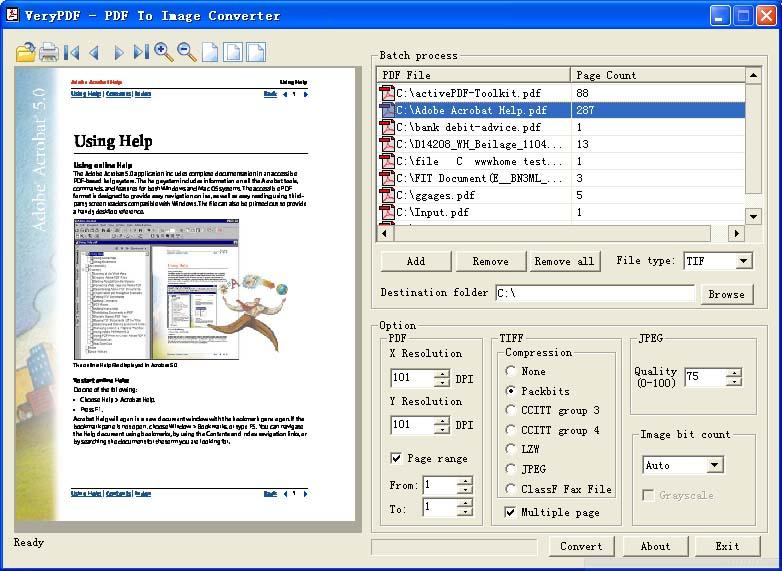
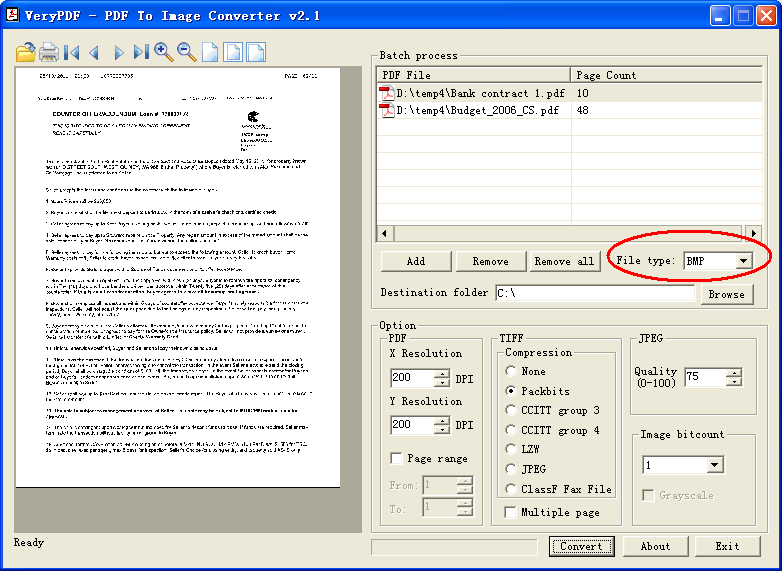
Acrobat to BMP Converter is able to convert Adobe Acrobat PDF files to BMP (or BITMAP) files, you can click "Add" button to load one or more PDF files, select "File Type" to "BMP", set options of resolution and color depth, click "Convert" button, then you can convert your PDF file to BMP file quickly,
Home |
Products |
Downloads |
Support |
Links | Contact
Copyright © 2000- VeryPDF.com, Inc. All rights reserved.
Send comments about this site to the webmaster.