 Home
PDF2Image ScreenShots
Articles
Products
Downloads
Home
PDF2Image ScreenShots
Articles
Products
Downloads
 |
Acrobat to Fax Converter - Acrobat To Fax Acrobat To Fax - Convert PDF files to Fax compatible TIFF files (acrobat2fax, acrobattofax), then you can fax your acrobat file easily |
The TIFF-F File Format
The TIFF (Tagged Image File Format) was developed by Aldus and Microsoft as an
extensible common file format for the exchange of image files.
Copies of the standard are available through Aldus.
In order to increase the portability of TIFF files, various classes of TIFF
files have been defined in order to clarify the requirements of readers and
writers to ensure compatibility.
Class F TIFF files are used for the exchange of fax images and are a subset of
Class B (bilevel or black & white) TIFF images.
Class F TIFF files may optionally use (and Faximum uses by default) a form of
lossless image compression technique, meaning that the image will not lose any
detail in the compression/decompression process.
Note that many word-processing programs can import TIFF-F files. Sometimes,
however, the compression used in a TIFF-F file may not be supported by the
word-processing program. In this case, the Faximum software includes a utility
called tiffcompress which may be used to change the compression of a TIFF-F
file.
THE SPIRIT OF TIFF CLASS F
TIFF Classes reduce the information burden on
TIFF readers and writers that wish to support narrow applications. For example,
Appendix G-1 of TIFF 5.0 states that classes enable TIFF readers "to know when
they can stop adding TIFF features." In other words, defining a Class enables
applications interested only in reading that Class to give up if the
characteristic tags and values are not present. Therefore, TIFF Class F insists
on a rather narrow definition of tags. In a general TIFF file, for example, the
writer would be free to create single-page documents without the NewSubFileType
and PageNumber tags. Not so for a Class F file, where the multi-page tag is
required even for a single page.
TIFF Class F is a sub-class of Class B (Bilevel). That is, all tags that are
required in Class B are also required in Class F. For some common tags, however,
Class F limits the range of acceptable values. The YResolution tag, for example,
is a Class B tag, but its Class F value is limited to either 98 or 196 dpi. Such
tags are listed in "Required Class F Tags."
Other Class B tags have a slightly eccentric meaning when applied to facsimile
images. These are discussed in the section "Bilevel Required."
There are also tags that may be helpful but are not required. These are listed
in the "Recommended Tags" section.
Finally, technical topics are discussed in the sections "Technical Points" and
"Warnings."
Compression = 3. SHORT. Group 3, one- dimensional encoding with "byte-aligned" EOLs. An EOL is said to be byte-aligned when Fill bits have been added as necessary before EOL codes such that EOL always ends on a byte boundary, thus ensuring an EOL-sequence of a 1 byte preceded by a zero nibble: xxxx0000 00000001. The data in a Class F image is not terminated with an RTC. Please see items 4 and 5 in the "Warnings" section.
For two-dimensional encoding, set bit 1 in Group3Options. Please see item 2 in the "Warnings" section.
FillOrder = 1, 2. SHORT. TIFF Class F readers must be able to read data in both bit orders, but the vast majority of facsimile products store data LSB first, exactly as it appears on the telephone line.
        1 = Most Significant Bit first.

        2 = Least Significant Bit first.
Group3Options = 4,5. LONG. Data may be one- or two-dimensional, but EOLs must be byte-aligned. Uncompressed data is not allowed.
        bit 0 = 0 for 1-Dimensional, 1 for 2-Dimensional

        bit 1 = must be 0 (uncompressed data not allowed)

        bit 2 = 1 for byte-aligned EOLs
ImageWidth = 1728, 2048, 2482. SHORT or LONG. These are the fixed page widths in pixels defined in CCITT Group 3.
NewSubFileType = 2. LONG. The value 2 identifies a single page of a multi-page image.
PageNumber. SHORT/SHORT. This tag specifies the page numbers in the fax document. The tag comprises two SHORT values: the first value is the page number, the second is the total number of pages. Single- page documents therefore use 00000001 hex.
ResolutionUnit = 2,3. SHORT. The units of measure for resolution:
        2 = Inch

        3 = Centimeter
XResolution = 204 (inches). RATIONAL.
The horizontal resolution of the image expressed in pixels per resolution unit.
YResolution = 98, 196 (inches). RATIONAL. The vertical resolution of the image expressed in pixels per resolution unit.
Although these tags are already required in Class B (Bi-Level) files, an explanation of their usage for facsimile images may be helpful.
BitsPerSample = 1. SHORT. Since facsimile is a black-and-white medium, this must be 1 (the default) for all files.
ImageLength. SHORT or LONG. LONG recommended. The total number of scan lines in the image.
PhotometricInterp = 0,1. SHORT. This tag allows notation of an inverted ("negative") image:
        0 = normal

        1 = inverted
Software. ASCII.
The optional name and release number of the software package that created the
image.
RowsPerStrip. SHORT or LONG. LONG recommended. The number of scan lines per strip. When a page is expressed as one large strip, this is the same as the ImageLength tag.
SamplesPerPixel = 1. SHORT. The value of 1 denotes a bi-level, grayscale, or palatte color image.
StripByteCounts. SHORT or LONG. SHORT recommended. For each strip, the number of bytes in that strip. If a page is expressed as one large strip, this is the total number of bytes in the page after compression.
StripOffsets. SHORT or LONG. For each strip, the offset of that strip. The offset is measured from the beginning of the file. If a page is expressed as one large strip, there is one such entry per page.
There are only three new tags for Class F. All three tags describe page quality. The information contained in these tags is usually obtained from the receiving facsimile hardware, but since not all devices are capable of reporting this information, the tags are optional.
Some applications need to understand exactly the error content of the data. For example, a CAD program might wish to verify that a file has a low error level before importing it into a high- accuracy document. Because Group 3 facsimile devices do not necessarily perform error correction on the image data, the quality of a received page must be inferred from the pixel count of decoded scan lines. A "good" scan line is defined as a line that, when decoded, contains the correct number of pixels. Conversely, a "bad" scan line is defined as a line that, when decoded, comprises an incorrect number of pixels.
     BadFaxLines
         Tag  = 326  (146 hex)
         Type = SHORT or LONG
This tag reports the number of scan lines with an incorrect number of pixels encountered by the facsimile during reception (but not necessarily in the file).
               Note: PercentBad = (BadFaxLines/ImageLength) * 100

     CleanFaxData
         Tag = 327 (147 hex)
         Type = SHORT

            N = 0

                         0 = Data  contains  no lines  with  incorrect
                             pixel counts or regenerated lines  (i.e.,
                             computer generated)

                         1 = Lines with an incorrect pixel count  were
                             regenerated by receiving device

                         2 = Lines  with  an  incorrect  pixel   count
                             existed,  but  were  not  regenerated  by
                             receiving device
Many facsimile devices do not actually output bad lines. Instead, the previous good line is repeated in place of a bad line. Although this substitution, known as line regeneration, results in a visual improvement to the image, the data is nevertheless corrupted. The CleanFaxData tag describes the error content of the data. That is, when the BadFaxLines and ImageLength tags indicate that the facsimile device encountered lines with an incorrect number of pixels during reception, the CleanFaxData tag indicates whether these lines are actually in the data or if the receiving facsimile device replaced them with regenerated lines.
     ConsecutiveBadFaxLines
         Tag  = 328 (148 hex)
         Type =  LONG or SHORT
This tag reports the maximum number of consecutive lines
containing an incorrect number of pixels encountered by the facsimile device
during reception (but not necessarily in the file).
The BadFaxLines and ImageLength data indicate only the quantity of such lines. The ConsecutiveBadFaxLines tag is an indicator of their distribution and may therefore be a better general indicator of perceived image quality.
BadFaxLines. LONG. The number of "bad" scan lines encountered by the facsimile during reception.
CleanFaxData = 0, 1, 2. BYTE. This tag indicates whether lines with incorrect pixel count are actually in the data or if the receiving facsimile device replaced them with regenerated lines.
                         0 = Data contains no lines with incorrect
                             pixel counts or regenerated lines (i.e.,
                             computer generated)

                         1 = Lines with an incorrect pixel count were
                             regenerated by receiving device

                         2 = Lines with an incorrect pixel count
                             existed, but were not regenerated by
                             receiving device
ConsecutiveBadFaxLines. LONG
or SHORT. The maximum number of consecutive scan lines with incorrect pixel
count encountered by the facsimile device reception.
DateTime. ASCII. Date and time in the format YYYY:MM:DD HH:MM:SS, in 24-hour format. String length including NUL byte is 20 bytes. Space between DD and HH.
DocumentName. ASCII. This is the name of the document from which the document was scanned.
ImageDescription. ASCII. This is an ASCII string describing the contents of the image.
Orientation. SHORT. This tag might be useful for displayers that always want to show the same orientation, regardless of the image. The default value of 1 is "0th row is visual top of image, and 0th column is the visual left." An 180-degree rotation is 3. See TIFF 5.0 for an explanation of other values.
In general, third-party applications that read and write TIFF files expect the image to be divided into "strips," also known as "bands." Each strip contains a few lines of the image. By using strips, a TIFF reader need not load the entire image into memory, thus enabling it to fetch and decompress small random portions of the image as necessary.
The dimensions of a strip are described by the RowsPerStrip and StripByteCount tags. The location in the TIFF file of each strip is contained in the StripOffsets tag.
The TIFF documentation suggests using strips of an arbitrary size of about 8K. Although various application programs assert that they "prefer" banded images, research failed to uncover a single existing application that could not read a single-strip page where they could read the same file in a multi- strip format. Indeed, applications seem to be more sensitive to the total size of the decoded image and are not particularly fussy about banding. This result is not surprising, considering that most desktop publishing programs are prepared to deal with massively larger images than those one finds in facsimile. In short, each page may be represented as a single strip of any length.
In fact, there may be a compelling reason to employ a strip size equal to the length of one A4 page (297 mm). When a document is imaged, it may be of any length. Not all fax machines, however, can accept unlimited length documents. Worse, the remote machine's page- length capability is not known until the fax connection has been established. The solution is for the transmitting fax device to image long documents into A4-size strips, then seam them together at transmission, after the capabilities of the remote fax machine is known.
Fax applications that do not wish to embrace TIFF Class F as a native format may elect to support it as import/export medium.
Export The simplest form of support is a Class F writer that produces individual single-page Class F files with the proper NewSubFile tag and the PageNumber (page one-of-one) tag.
Import A Class F reader must be able to handle a Class F file containing multiple pages.
Recall that Huffman encoding encodes bits, not bytes. This means that the end-of-line token may end in the middle of a byte. In byte alignment, extra zero bits (Fill) are added so that the first bit of data following an EOL begins on a byte boundary. In effect, byte alignment relieves application software of the burden of bit-shifting every byte while parsing scan lines for line-oriented image manipulation (such as writing a TIFF file).
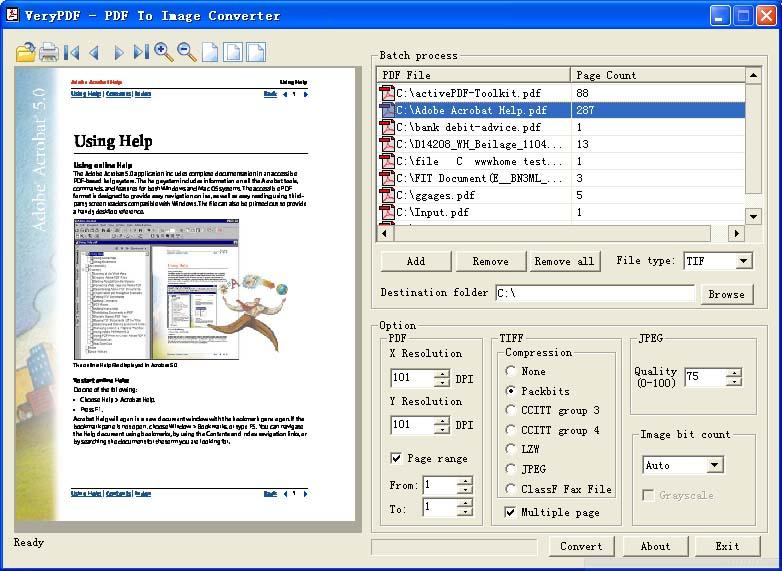
Acrobat to Fax Converter is able to create faxable
TIFF format, Acrobat to Fax Converter command line is support following
parameters,
-c [compress] : Set
compression method in generated image files (for tif only)
-c none : Create TIFF file without
compression
-c lzw : Compress TIFF using
LZW arithmetic
-c jpeg : Compress TIFF using JPEG
arithmetic
-c packbits : Compress TIFF using packbits arithmetic
-c g3 : Compress TIFF
using CCITT G3 arithmetic
-c g4 : Compress TIFF
using CCITT G4 arithmetic
-c ClassF : Compress
TIFF into Fax compatible ClassF 204x98 format
-c ClassF196: Compress TIFF into
Fax compatible ClassF 204x196 format
"-c ClassF" and "-c ClassF196" parameters will create ClassF 204x98 and ClassF
204x196 formats, you can use following command lines to convert PDF file to
Faxable TIFF format,
the following command line will convert PDF file to single page 204x98 Faxable
TIFF files,
pdf2img -i C:\input.pdf -o C:\output.tif -c ClassF -b 1
the following command line will convert PDF file to multi-page 204x98 Faxable
TIFF file,
pdf2img -i C:\input.pdf -o C:\output.tif -c ClassF -b 1 -m
the following command line will convert PDF file to single page 204x196 Faxable
TIFF files,
pdf2img -i C:\input.pdf -o C:\output.tif -c ClassF196 -b 1
the following command line will convert PDF file to multi-page 204x196 Faxable
TIFF file,
pdf2img -i C:\input.pdf -o C:\output.tif -c ClassF196 -b 1 -m
You can also create Fax compatible TIFF files by Acrobat to Fax Converter SDK
product,
#define COMPRESSION_NONE
1 /* dump mode */
#define COMPRESSION_CCITTRLE 2
/* CCITT modified Huffman RLE */
#define COMPRESSION_CCITTFAX3 3 /*
CCITT Group 3 fax encoding */
#define COMPRESSION_CCITTFAX4 4 /*
CCITT Group 4 fax encoding */
#define COMPRESSION_LZW
5 /* Lempel-Ziv & Welch */
#define COMPRESSION_JPEG
7 /* %JPEG DCT compression */
#define COMPRESSION_PACKBITS
32773 /* Macintosh RLE */
#define COMPRESSION_CLASSF
88888888
#define COMPRESSION_CLASSF196 88888889
#define COMPRESSION_CLASSF204X98_G3 88888886
#define COMPRESSION_CLASSF204X196_G3 88888887
#define COMPRESSION_CLASSF204X98_G4 88888888
#define COMPRESSION_CLASSF204X196_G4 88888889
nResult = PDFToImageConverter("test.pdf", "out.tif", NULL, NULL, 200, 200, 1,
COMPRESSION_CLASSF204X98_G3,
100, TRUE, TRUE, -1, -1);
nResult = PDFToImageConverter("test.pdf", "out.tif", NULL, NULL, 200, 200, 1,
COMPRESSION_CLASSF204X196_G3,
100, TRUE, TRUE, -1, -1);
nResult = PDFToImageConverter("test.pdf", "out.tif", NULL, NULL, 200, 200, 1,
COMPRESSION_CLASSF204X98_G4,
100, TRUE, TRUE, -1, -1);
nResult = PDFToImageConverter("test.pdf", "out.tif", NULL, NULL, 200, 200, 1,
COMPRESSION_CLASSF204X196_G4,
100, TRUE, TRUE, -1, -1);
Click here to learn more...
Home |
Products |
Downloads |
Support |
Links | Contact
Copyright © 2000- VeryPDF.com, Inc. All rights reserved.
Send comments about this site to the webmaster.