 Home
PDF2Image ScreenShots
Articles
Products
Downloads
Home
PDF2Image ScreenShots
Articles
Products
Downloads
 |
Acrobat to JPG Converter - Acrobat to JPG Acrobat to JPG - Convert Acrobat files to JPG files (acrobat2jpg,acrobattojpg) |
What is the difference between JPEG and JPG
images? What is JPG or JPEG?
JPG or JPEG is the compressed form of picture. It is the format of the pictures
files. But Jpg files have many disadvantages also. It reduces the quality of the
images whenever you reduces the size or edit the pictures. JPEG is the
compressed form is picture which is expand after the editing the picture which
decreases the quality of the images. JPG can be open with the Paint application
of windows.
JPEG (Joint Photographic Experts Group) is a lossy compression method
standardized by ISO. Jpg, jpeg, jpe, jfif are all extension used for pictures,
.jpg is just the shorter version of .jpeg. The major difference between the JPEG
and JPG is the usage of the platforms (Operating Systems). JPEG is the extension
given by the Macintosh and JPG is the extension used in Windows.
Lossy compression formats are generally suited for photographs. It is not suited
for illustrations, drawings and text, as compression artifacts from compressing
the image will standout. Lossy compression, as its name implies, does not encode
all the information of the file, so when it is recovered into an image, it will
not be an exact representation of the original. However, it is able to compress
images very effectively compared to lossless formats, as it discards certain
information. A prime example of a lossy compression format is JPEG.
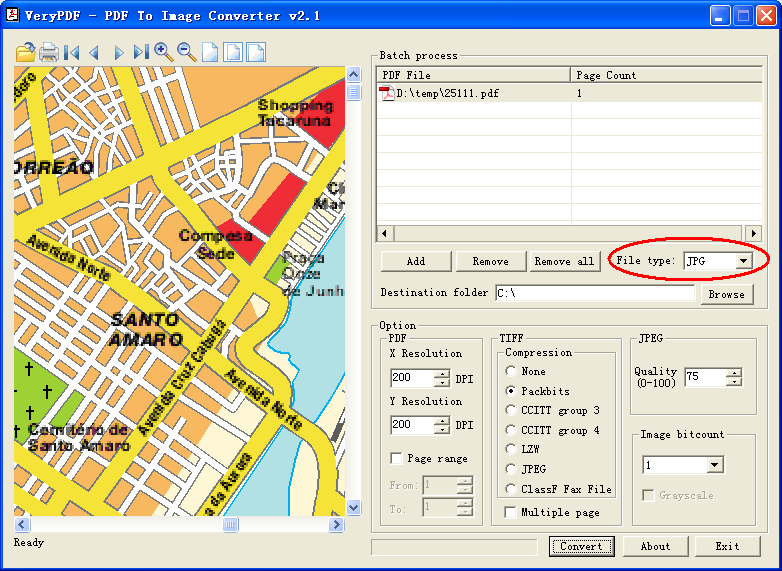
Acrobat to JPG Converter is able to convert Acrobat PDF files to color JPG
files, see following screenshot, you can convert a color map from PDF file to
color JPG format quickly,
Acrobat to JPG Converter does support command
line operation, for example, you can run following command line to convert from
page 1 to page 9 from PDF file to JPG files, you will get 9 JPG files by
following command line,
pdf2img -f 1 -l 9 C:\input.pdf -o C:\output.jpg
You can also run following command line to convert all of your PDF files in C:\
folder to all JPG files, this is the batch conversion, you needn't input the
filename for each PDF file,
pdf2img -i C:\*.pdf -o C:\*.jpg
Click here to learn more...
Home |
Products |
Downloads |
Support |
Links | Contact
Copyright © 2000- VeryPDF.com, Inc. All rights reserved.
Send comments about this site to the webmaster.