 Home
PDF2Image ScreenShots
Articles
Products
Downloads
Home
PDF2Image ScreenShots
Articles
Products
Downloads
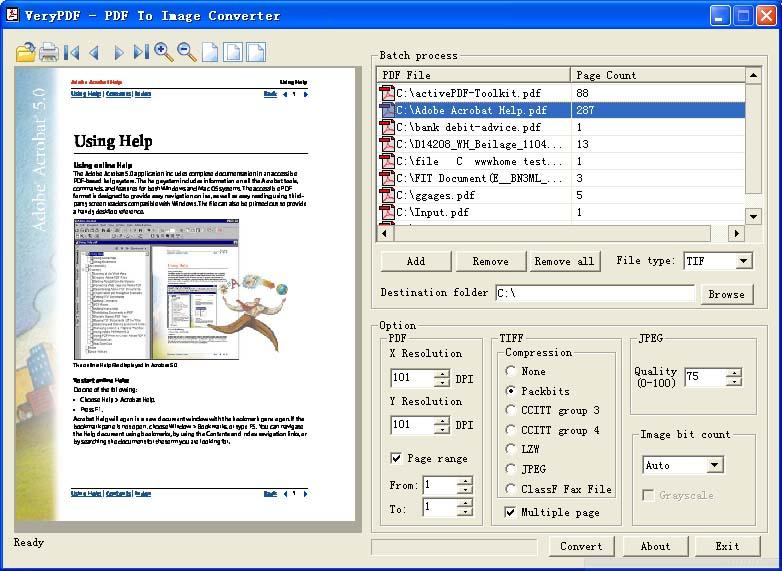 |
Acrobat to TIFF Converter Acrobat to TIFF - Convert Acrobat files to TIFF files (acrobat2tiff,acrobattotiff) |
TIFF format is a great format for
archiving, TIFF is a raster bitmapped format. The structure of TIFF files is
actually a lot simpler. As a result a solution for functioning with documents in
this format is not only a lot more feasible, but can be more varied, because
you'll find several independent developers available. Getting selected TIFF as a
single format, you are able to be self-confident that documents submitted to the
archive will always be readable, given that in the selection of installed
packages on all operating techniques is actually a program for viewing files of
this format. Indexing documents within the TIFF format isn't only
straightforward, but frequently doesn't cost something. Available on the market
there exist tons of applications, such as these totally free of charge, which do
a fantastic job of dealing with this job!
Acrobat to TIFF Converter is the best product to convert Acrobat PDF files to
TIFF files, it doesn't requires Adobe Acrobat and other third-party libraries or
printer drivers, it is a stand-alone application. Acrobat to TIFF Converter is
support LZW, CCITT-FAX3 (G3 or Group 3), CCITT-FAX4 (G4 or Group 4), RLE,
PACKBITS, JPEG compression methods in TIFF format.
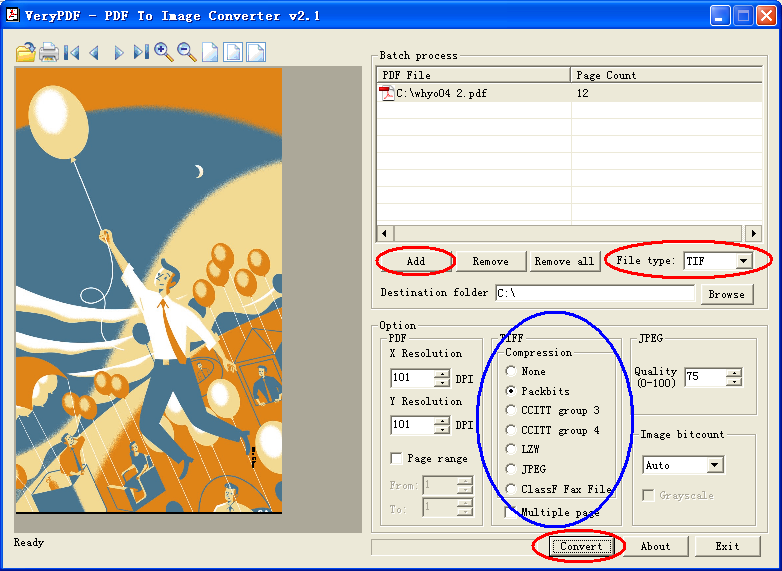
You can by following steps to
convert your Acrobat PDF files to TIFF files,
1. You can click "Add" button to add a PDF file into file list, Preview Area
will show the first page of your Acrobat PDF file,
2. Choose "TIF" format as output format type,
3. Adjust some settings that you need.
4. Adjust the resolution that you need, the resolution option will affect the
quality to output TIFF image format, you can change the resolution option up to
2400DPI.
5. Click "Browse" button to choose a destination folder, if you leave it as
blank, Acrobat to TIFF Converter will output the TIFF files to the folder where
original PDF file exist,
6. Click "Convert" button to Start Conversion.
Click here to learn more...
Home |
Products |
Downloads |
Support |
Links | Contact
Copyright © 2000- VeryPDF.com, Inc. All rights reserved.
Send comments about this site to the webmaster.