 Home
PDF2Image ScreenShots
Articles
Products
Downloads
Home
PDF2Image ScreenShots
Articles
Products
Downloads
 |
PDF to Multi-page TIFF Converter PDF to Multi-page TIFF - Convert PDF files to Multi-page TIFF files |
VeryPDF PDF to Image Converter SDK is able to
convert PDF to Multi-page TIFF format, when you set "multipage" parameter to 1,
PDFToImageConverter() function will convert your multi-page PDF file to
multi-page TIFF format, please refer to following sample code,
using
System;
using System.Runtime.InteropServices;
namespace CSharpConsole
{
///
<summary>
///
Summary description for DotNetConsoleClass.
///
</summary>
class
DotNetConsoleClass
{
[DllImport(@"pdf2image.dll",
CharSet=CharSet.Auto)]
static
extern
uint
PDFToImageConverter(
[MarshalAs(UnmanagedType.LPStr)]
string
FileName,
[MarshalAs(UnmanagedType.LPStr)]
string
OutputName,
IntPtr UserPassword,
IntPtr
OwnPassword,
int xresolution,
int
yresolution, int
bitcount,
int compression,
int
quality, int
grayscale,
int multipage,
int
firstPage, int
lastPage);
[DllImport(@"pdf2image.dll",
CharSet = CharSet.Ansi)]
static
extern
uint
PDFToImageSetCode(string
lpRegcode);
const
int
TRUE = 1;
const
int
FALSE = 0;
const
int
COMPRESSION_NONE = 1; //
dump mode
const
int
COMPRESSION_CCITTRLE = 2;
// CCITT modified Huffman RLE
const
int
COMPRESSION_CCITTFAX3 = 3;
// CCITT Group 3 fax encoding
const
int
COMPRESSION_CCITTFAX4 = 4;
// CCITT Group 4 fax encoding
const
int
COMPRESSION_LZW = 5; //
Lempel-Ziv & Welch
const
int
COMPRESSION_JPEG = 7; //
%JPEG DCT compression
const
int
COMPRESSION_PACKBITS = 32773;
// Macintosh RLE
///
<summary>
///
The main entry point for the application.
///
</summary>
[STAThread]
static
int
Main(string[]
args)
{
IntPtr UserPassword =
IntPtr.Zero;
IntPtr OwnPassword =
IntPtr.Zero;
string SourceName =
"C:\\test.pdf";
string DestName =
"C:\\test.tif";
uint result = 1;
Console.WriteLine("CSharp,
converting " + SourceName +
" to "
+ DestName);
try
{
PDFToImageSetCode("XXXXXXXXXXXXXXXXXXXXXXXXXXXXXXX");
result =
PDFToImageConverter(SourceName,DestName,UserPassword,OwnPassword,200,200,1,COMPRESSION_CCITTFAX4,70,FALSE,TRUE,-1,-1);
Console.Write("Result:
" + result.ToString());
}
catch (Exception
ex)
{
Console.Write("Error:
" + ex.Message);
}
Console.Write(",
press enter...");
Console.ReadLine();
return (int)
result;
}
}
}
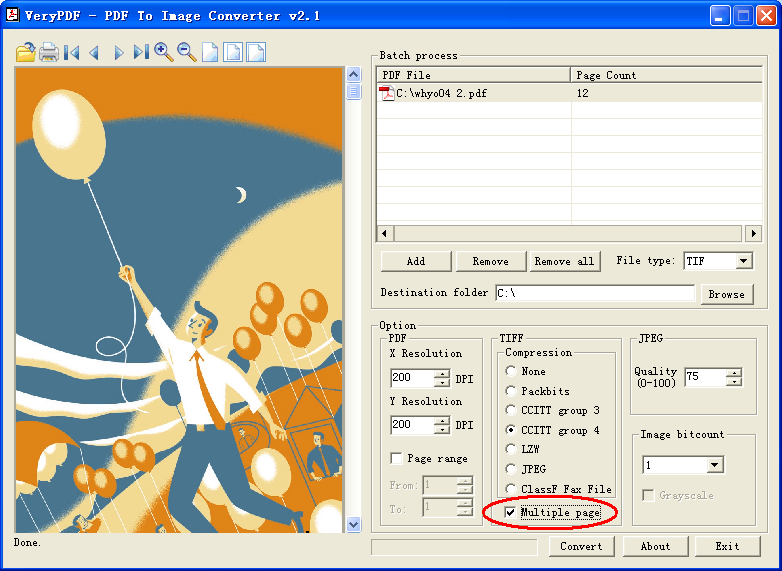
In the PDF to Multi-page TIFF Converter GUI application, you can select "Multiple page" option to convert PDF files to Multi-page TIFF formats,
Home |
Products |
Downloads |
Support |
Links | Contact
Copyright © 2000- VeryPDF.com, Inc. All rights reserved.
Send comments about this site to the webmaster.