I am a paid user of "very pdf pdf stamper 2.3."
I would like to know if there is any way to adjust Bates numbers on the page beyond the basic -- top center, bottom center, etc -- adjustment.
I.e., I would like to move the numbers over to the left a 1/4" inch or so and up on the page a 1/4" or so. I am using bottom right as my # placement.
I do not see this in the documentation.
Thanks, in advance, for your assistance.
===================
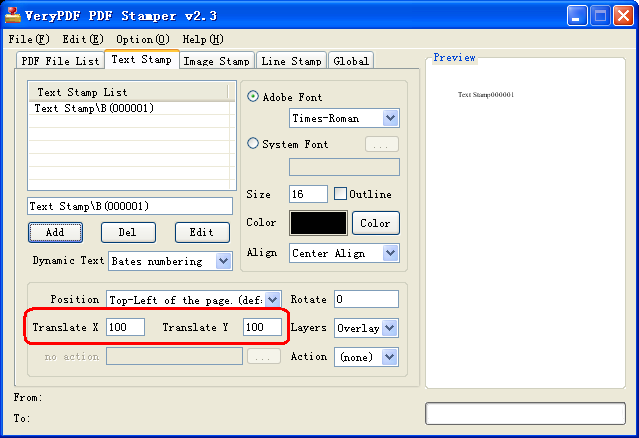
Thanks for your message, you can use “Translate X” and “Translate Y” options to move the text stamp, please refer to following screenshot,
VeryPDF
=====================
=====================
Thanks, I thought that did it, but I was doing bottom right numbering and it moved the numbers off the page. Had trouble entering a negative integer, which I finally figured out.
Nice program.
Can this program put the multiple numbers across a page, like for 8 up numbered tickets.
======================
Yes, of course, you can add any number of stamps to the PDF page, that’s no problem.
VeryPDF