I am wondering if your VeryPDF PDF to HTML product can produce a single HTML file with embedded images and css styles as opposed to an HTML file with a folder with linked resources.
Customer
----------------------------------------------
Yes, our PDF to HTML Converter does convert multi-page PDF file to single page HTML file, you can download and install PDF to HTML Converter GUI version from following web page,
https://www.verypdf.com/app/pdf-to-html-converter/try-and-buy.html
https://www.verypdf.com/pdf2htm/pdf2htm.exe
You can click "File"->"Preferences"->"General"->click check-box "Generate as continuous HTML page" option, then you can convert your PDF file to single page HTML file easily.
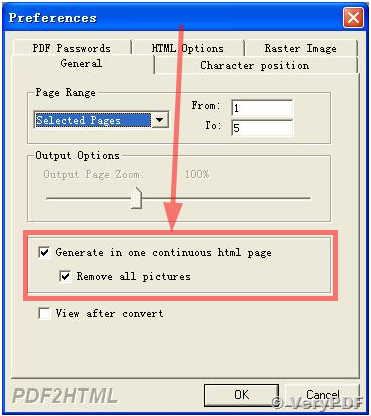
Here is the user manual for PDF to HTML GUI Converter,
https://www.verypdf.com/pdf2htm/help/help.html
PDF to HTML Command Line Converter is support this function too, please look at following web page for more information,
https://www.verypdf.com/wordpress/201204/convert-pdf-pages-to-one-continuous-html-27344.html
VeryPDF