VeryPDF Despeckle SDK can be downloaded from following web page,
https://www.verypdf.com/app/papertools/try-and-buy.html
https://www.verypdf.com/dl2.php/papertoolssdk.zip
VeryPDF Despeckle SDK (API) allows the removal of speckle in scanned or faxed images. The speckle is the presence of black points of noise in images acquired by a scanner or received by fax.
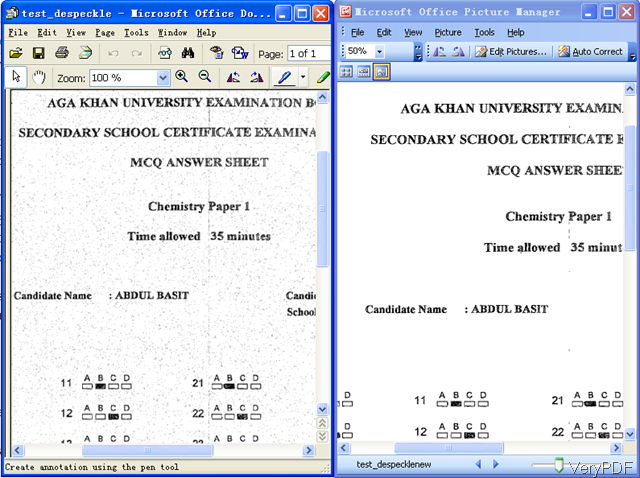
Cleaning images is a very important preprocessing step to improve the compression rate, the visualization aspect and the accuracy using ICR/OCR.
Despeckle (speckle detection and deletion) can be very easily performed, specifying the maximum width and height of isolated black elements to be considered as speckle.

The following is a C# source code example to apply despeckle to your image files,
string appPath = Path.GetDirectoryName(Application.ExecutablePath);
System.Type VeryPDFType = System.Type.GetTypeFromProgID("VeryPDF.PaperToolsCom");
VeryPDF.PaperToolsCom VeryPDFCom = (VeryPDF.PaperToolsCom)System.Activator.CreateInstance(VeryPDFType);
string appFolder = Path.GetDirectoryName(Application.ExecutablePath);
string strFolder = Directory.GetParent(appFolder).FullName;
string strReturn = "";
int nFileIndex = 0;
VeryPDFCom.EnableDebugLog(true);
string strInFile = strFolder + "\\sample\\test_table_ocr.tif";
string strOutFile = strFolder + "\\sample\\output\\_output_" + nFileIndex.ToString() + ".png";
string strCmd = "-$ XXXXXXXXXXXXXXXXXX -despeckle \"" + strInFile + "\" \"" + strOutFile + "\"";
strReturn = strReturn + VeryPDFCom.PaperTools(strCmd);
string strInFile = strFolder + "\\sample\\test_table_ocr.tif";
string strOutFile = strFolder + "\\sample\\output\\_output_" + nFileIndex.ToString() + ".png";
string strCmd = "-$ XXXXXXXXXXXXXXXXXX -despeckle2 \"" + strInFile + "\" \"" + strOutFile + "\"";
strReturn = strReturn + VeryPDFCom.PaperTools(strCmd);
If you encounter any problem with VeryPDF Despeckle SDK, please feel free to let us know.