Skip to content
VeryPDF Knowledge Base

VeryPDF Knowledge Base

Knowledge Base to VeryPDF Products

  • Home
  • Products
    • PDF to Any Converter
      • PDF to Word Converter
      • PDF to Word OCR Converter
      • PDF to Excel Converter
      • PDF to Excel OCR Converter
      • PDF to Text Converter
      • PDF to Text OCR Converter
      • PDF to HTML Converter
      • PDF Extract TIFF
      • PDF to Image Converter
      • PDF to PowerPoint Converter
    • Any to PDF Converter
      • AutoCAD to PDF Converter
      • PCL to PDF Converter
      • Image to PDF Converter
      • Image to PDF OCR Converter
      • HTML to PDF Converter
      • Document Printer
      • Document Converter
      • PowerPoint to Flash Converter
      • PowerPoint Converter
      • Free Text To PDF Converter
      • Metafile To PDF Converter
      • Office to Any Converter
    • PDF Utilities
      • PDFcamp Printer
      • PDF Editor
      • PDF Password Remover
      • Encrypt PDF
      • PDF Stamper
      • PDF Print
      • PDF Form Filler
      • Advanced PDF Tools
      • PDF Split-Merge
      • PDF Size Splitter
      • PDF Manual Splitter
      • PDF Optimizer
      • PDF Crop
      • PDF to PDF/A Converter
      • PDF Batch Print
    • Graphics Tools
      • TIFF Toolkit
      • Raster to Vector Converter
      • PDF to Flash Flip Book Converter
      • Image to Text OCR Converter
    • Business & OCR
      • PDF to Excel Converter
      • PDF to Excel OCR Converter
      • Scan to Excel OCR Converter
      • PDF to Word Converter
      • PDF to Word OCR Converter
      • Scan to Word OCR Converter
      • Office to Any Converter
      • Screen OCR
      • TIFF Toolkit
    • Multimedia
      • Flash to Image Converter
      • PowerPoint to Video Converter
      • Flash to Animated GIF Converter
      • PowerPoint to Flash Converter
      • PowerPoint Converter
    • Virtual Printer
      • PDFcamp Printer
      • Document Printer
      • Document Converter
      • Mini EMF Printer Driver
    • Development
      • Doc Converter COM Component
      • PDF Editor OCX Control
      • PDF to Text Converter SDK
      • Image to PDF Converter SDK
      • Image to PDF OCR Shell
      • HTML Converter Command Line
      • PDF to Image Converter SDK
      • PCL to PDF Converter SDK
      • PDF Password Remover SDK
      • Encrypt PDF SDK
      • PDF Split-Merge SDK
      • PDF Stamp SDK
      • PDF Print SDK
      • PDF Form Filler OCX
      • Advanced PDF Tools SDK
      • PDF Editor Toolkit SDK
      • Document Converter SDK
    • Customization
      • Custom Development Solution
    • More >>
  • Solutions
    • Web Viewer Solution
    • Web Annotator Solution
    • OCR Solution
    • PDF to Office Solution
    • PDF Form Filler Solution
    • Document Security Solution
    • Printer Intercept and Capture
    • PDF Extraction Solution
    • Paperless Printing Solution
    • Document Conversion
    • PDF Digital Signature
    • More >>
  • Blog
    • Advanced PDF Tools
    • docPrint Pro
    • PDFcamp Printer
    • PDF Editor
    • PDF Print
    • OCR Products
    • HTML to PDF Converter
    • PDF to Image Converter
    • Image to PDF Converter
    • PDF to Word Converter
  • Company
    • About Us
    • Contact Us

Intelligent PDF Data Extraction with VeryPDF Data Extraction SDK: JSON Output, Table Extraction, and More

Posted on 2023/04/22Author VeryPDF / 901 Views

In today's world, information is king. From small businesses to large corporations, data is a vital resource that drives growth, innovation, and decision-making. However, extracting valuable data from documents such as PDFs can be a daunting and time-consuming task. VeryPDF Data Extraction SDK is a powerful tool that allows developers to extract structured text, data, tables, and articles from PDFs, and output the results in JSON format.

VeryPDF PDF to Text OCR Converter Command Line,

https://www.verypdf.com/app/pdf-to-text-ocr-converter/index.html

VeryPDF OCR to Any Converter Command Line,

https://www.verypdf.com/app/ocr-to-any-converter-cmd/index.html

VeryPDF PDF Extract Tool Command Line,

Contact Us for Custom Development Solutions
Response within 24 hours

https://www.verypdf.com/app/pdf-extract-tool/index.html

VeryPDF Scan to Excel OCR Converter,

https://www.verypdf.com/app/scan-to-excel-ocr/index.html

PDF to Excel Converter Command Line,

https://veryutils.com/pdf-to-excel-converter-command-line
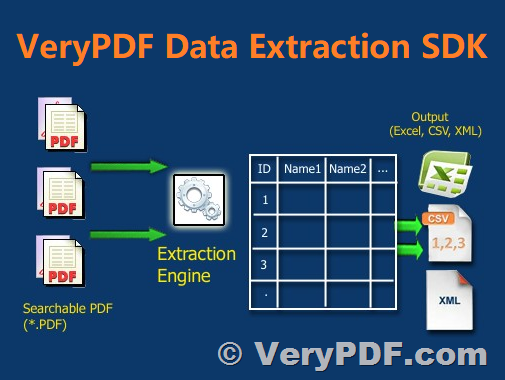
Intelligent PDF Data Extraction with VeryPDF Data Extraction SDK: JSON Output, Table Extraction, and More

By converting PDF content into JSON data, users can unlock information stored in PDFs and leverage it for other applications, enabling efficient workstreams and reducing overhead costs. With the VeryPDF Data Extraction SDK, developers can automate processes and free up their users from the burden of customizing countless document parameters and monitoring for inaccurate output.

Text extraction is a key feature of the VeryPDF Data Extraction SDK, which allows users to convert PDF text to JSON data, or readable Unicode text, regardless of language or font. With the ability to extract characters, words, fonts, and form fields, users can populate a full-text search engine to search across a set of documents. This makes it easy to find the information you need, without the need to manually search through countless pages.

Table extraction is another important feature of the VeryPDF Data Extraction SDK, which can detect tables and programmatically extract information as JSON, XML, or HTML. This can save countless hours of manual work, as users no longer need to manually copy and paste data from tables into spreadsheets or other applications.

Form field extraction is also supported by the VeryPDF Data Extraction SDK, which can serialize forms into JSON or into the industry-standard XFDF format to extract, edit, or insert form field data. This feature can be especially useful for users dealing with large numbers of forms, such as surveys, job applications, or tax forms.

Image extraction is another valuable feature of the VeryPDF Data Extraction SDK, which can extract individual images or graphics embedded within a PDF or convert pages into images. This can be useful for users dealing with documents containing images, such as invoices or receipts.

Annotation extraction is a powerful feature of the VeryPDF Data Extraction SDK, which can serialize annotations into the industry-standard XFDF format (compatible with most PDF viewers). This feature allows users to edit annotations without modifying the underlying document and share annotations with other users for real-time collaboration.

Metadata extraction is another key feature of the VeryPDF Data Extraction SDK, which can analyze PDFs at a low level and grab the PDF version, author information, timestamps, and anything else hidden away in the file. This feature can be useful for users who need to track the history of a document or need to know when a document was last updated.

VeryPDF Data Extraction SDK is a powerful tool that can save countless hours of manual work by allowing developers to extract structured text, data, tables, and articles from PDFs and output the results in JSON format. With features such as text extraction, table extraction, form field extraction, image extraction, annotation extraction, and metadata extraction, the VeryPDF Data Extraction SDK is a must-have tool for any organization that needs to unlock information stored in PDFs.

If you are interested in this VeryPDF Data Extraction SDK, please feel free to contact us,

http://support.verypdf.com/

Contact Us for Custom Development Solutions
Response within 24 hours

Related Posts

  • Convert PDF to XML and SVG with VeryPDF PDF Extract Tool Command Line for Data Extraction and Automation
  • Streamline Form Filling with VeryPDF PDF Form Filler SDK and HTML5 PDF Form Filler Online
  • VeryPDF PDF SDK for Developers: Built for Developers, Trusted by Enterprises! Powerful PDF Toolkit for Developers to Edit, Convert, Sign, Secure, and Automate PDF Documents
  • [Solution] VeryPDF’s Core Technologies and Custom Development Services
  • [Solution] Unlock the Power of DeepSeek + PDF Technology with VeryPDF’s Custom Development Solutions
  • VeryPDF Cloud API Self-Hosted Solution – Secure PDF Processing, Conversion, Editing, and Automation Toolkit
  • VeryPDF PDF Extract allows you to extract content from PDF files and save it in a structured data format
  • VeryPDF PDF Extract API: Fast and Accurate Data Extraction
  • Powerful VeryPDF PDF Conversion SDK for Developers: Convert PDF, Word, Excel, PowerPoint, HTML, and More!
  • PDF Indexed Search Library for Developers to Search and Highlight Keywords in PDF pages
  • VeryPDF Server OCR, Automated high-volume conversion of scanned documents to searchable PDF
  • [VeryPDF Release Notes] VeryPDF has released OCR to Any Converter Command Line v6.0 today
  • Change color image to black & white image by adjusting dither through command line
  • How to extract columns of text from a PDF file by OCR command line application?
  • How to convert bmp file to word?

Related posts:

Problem with PdfToImageConverter2
How to convert scanned PDF to Excel in batches
Convert specified pages of PDF to HTML by command line
How to fill PDF forms and save as a new PDF
Data Extraction Suite: extract any data from PDF, Image, etc. documents from .NET, ASP.NET, SSRS, Wi...
How to Create High Quality TIFF Images from a PDF File?
How to Accurately Convert PDF Bank Statements to CSV or Excel Without Adobe Acrobat (Without Risking...
Convert PDF to XML and SVG with VeryPDF PDF Extract Tool Command Line for Data Extraction and Automa...
Category: OCR Products, PDF to Excel OCR Converter, PDF to Text Converter, PDF to Text OCR Command Line, Table Extractor OCR Tag: content extraction, data capture, data extraction, data mining, document analysis, document automation, document data extraction, document processing, form field extraction, image recognition, intelligent data, json output, metadata extraction, ocr sdk, ocr technology, pdf annotation, pdf automation, pdf conversion, pdf data, pdf data analysis, pdf data conversion, pdf data extraction, pdf data mining, pdf data parsing, pdf data processing, pdf data scraping, pdf editing, pdf extraction, pdf form, pdf forms, pdf image, pdf parsing, pdf parsing library, pdf parsing software, pdf scraping, pdf sdk, pdf search, pdf table, pdf text, pdf to html, pdf to image, pdf to json, pdf to text, pdf to xml, sdk library, structured text, table extraction, text recognition

Post navigation

Previous PostEmbed best-in-class PDF document signing experiences or sign programmatically in your web, mobile, desktop, and server solutions with VeryPDF PDF Digital Signature Library
Next PostPowerful VeryPDF PDF Conversion SDK for Developers: Convert PDF, Word, Excel, PowerPoint, HTML, and More!

Custom Development Services

VeryPDF offers customized development services to meet your unique business needs, including PDF Processing, Document Automation, Document Analysis, Format Conversion, OCR, DRM, Barcode Solutions, Virtual Printer, Digital Signature, AI Integration, and more. Contact us today to get a personalized solution!

Meta

  • Log in
  • Entries RSS
  • Comments RSS
  • VeryPDF.com
  • VeryDOC.com
  • VeryUtils.com
  • imPDF.com

Recent Solutions

  • image_thumb.png[Solution] Two VeryPDF Virtual Printer Workflows: Inherit Physical Printer …
  • image_thumb.png[Solution] Custom Virtual Printer Workflow Solution with VeryPDF: PDF Captu…
  • image_thumb.png[Solution] Virtual Printer SDK & Custom Development Solutions – P…
  • image_thumb.png[Solution] Capture High-Volume Batch Printing to PDF: Convert a 7,000-Page …
  • image_thumb.png[Solution] How to Enable “Keep Spooler Files” on Windows Printe…

Recent Posts

  • image_thumb.png[Solution] Two VeryPDF Virtual Printer Workflows: Inherit Physical Printer …
  • image_thumb.png[Solution] Custom Virtual Printer Workflow Solution with VeryPDF: PDF Captu…
  • image_thumb.png[Solution] Virtual Printer SDK & Custom Development Solutions – P…
  • image_thumb.png[Solution] Capture High-Volume Batch Printing to PDF: Convert a 7,000-Page …
  • image-20250607_192212_4409.pngHow to Add Freehand Drawing, Shapes, and Text Notes on DRM-Protected PDFs f…

Categories

Archives

Calendar

April 2023
M T W T F S S
« Mar   May »
 12
3456789
10111213141516
17181920212223
24252627282930
© 2026 VeryPDF Knowledge Base / VeryPDF.com / VeryDOC.com / VeryUtils.com / Support
Contact
Us