Do you have a tool that can be integrated into a net project and can identify if a PDF file has a page that is grayscale or color or black and white (monochrome)?
I want to count how may color pages, grayscale pages and black and white pages in a PDF file.
Customer
----------------------------------------
"PDF to Image Converter COM/SDK" software has this function, you may download the trial version of "PDF to Image Converter COM/SDK" from following web page to try,
https://www.verypdf.com/app/pdf-to-image-converter/try-and-buy.html#buy-cvt-com
https://www.verypdf.com/pdf2tif/pdf2image_sdk_trial.zip
after you download it, you can use following C++ source code to identify color, grayscale, black and white pages from PDF file easily,
void main(int argc, char *argv[])
{
if(argc != 2)
return;
char *lpPDFFile = argv[1];
PDFToImageSetCode("XXXXXXXXXXXXXXXXXXXXXXX");
int time1 = GetTickCount();
int nPageCount = PDF2Image_GetPageCount(lpPDFFile);
printf("PageCount = %d\n", nPageCount);
for(int page = 0; page < nPageCount; page++)
{
int nColorType = PDF2Image_Is_Color_OR_Grayscale_Page(lpPDFFile, page+1);
switch(nColorType)
{
case 1:
printf("Page %d is a 'color' page.\n", page+1);
break;
case 2:
printf("Page %d is a 'grayscale' page.\n", page+1);
break;
case 3:
printf("Page %d is a 'black and white' page.\n", page+1);
break;
default:
printf("Failed to retrieve color information from page %d.\n", page+1);
break;
}
}
int time2 = GetTickCount();
printf("[Message] Used time = %d (%.2fs)\n", time2-time1, (time2-time1)/1000.0);
}
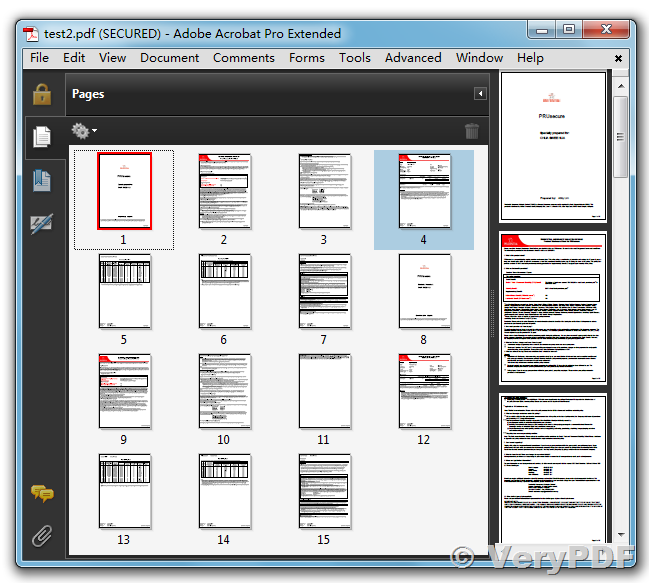
The trial pdf2image_sdk_trial.zip package contains a "pdf2img_is_color_grayscale_page.exe" application, you can run it in CMD window to determine Color & Grayscale & Black and White pages from PDF file easily, for example,
D:\VeryPDF>pdf2img_is_color_grayscale_page.exe test2.pdf
PageCount = 15
Page 1 is a 'color' page.
Page 2 is a 'color' page.
Page 3 is a 'black and white' page.
Page 4 is a 'color' page.
Page 5 is a 'black and white' page.
Page 6 is a 'black and white' page.
Page 7 is a 'black and white' page.
Page 8 is a 'color' page.
Page 9 is a 'color' page.
Page 10 is a 'black and white' page.
Page 11 is a 'black and white' page.
Page 12 is a 'color' page.
Page 13 is a 'black and white' page.
Page 14 is a 'black and white' page.
Page 15 is a 'black and white' page.
[Message] Used time = 9032 (9.03s)
btw, Spool File Page Counter SDK has this function too, you may download and test Spool File Page Counter SDK from following web page,
http://www.verydoc.com/spool-page-count.html
VeryPDF