|
1.Introduction
PDF Split-Merge is a stand-alone application that can be used to split, merge, and manage your PDF files, PDF Split- Merge is offered as an easy to use GUI (Graphical User Interface) application, and a command line application.
PDF Split-Merge is used to split files by pages, you can split the file into single pages or save every a few pages as a new file, it also can be used to merge multiple PDF files or selected pages from one or more files into a PDF file, preservation of original links, and form fields.
PDF Split-Merge software is a standalone program and does not require Adobe Acrobat, or even Acrobat Reader.
2.Key features of PDF Split-Merge
- Standalone software, Adobe Acrobat and Reader NOT required!
-
Merge multiple PDF files or selected pages from one or more files into a PDF
file;
- Generate a new PDF file by merging one or more PDF documents;
-
Assemble new files by appending pages to existing documents;
-
Split PDF
documents by page numbers or by even, odd or custom page ranges etc;
-
Split by page ranges (split pages, page ranges, odd/even pages ...);
-
Split a file into single pages or sets of pages;
-
Support Command Line
Operation (for manual use or inclusion in scripts);
-
Support
Win98/ME/NT/2000/XP/Vista/7 platforms;
-
Easy to use;
-
Support PDF1.8
file format (formerly only supported by Acrobat 9.0);
- Merge from text file, a text file which contains file names to be
merged, one file name per line;
- Split into n pages (into files which containing n pages per file);
- Reverse or rearrange pages in a document;
- Retain links (update links, bookmarks and destinations between merged
PDF files);
- Preserve all kinds of annotations;
- Split PDF documents by bookmarks;
- Extract all or individual chapters according to bookmarks;
- Because of built-in support for server environment, PDF Split-Merge is a
good match for concurrent and server based applications;
-
Support to
retain or remove bookmarks and AcroForms within processing;
- Support "owner" password protected PDF files;
- Support use overlapping page ranges to create output PDF files;
-
Support get page count from a PDF file from command line;
-
Insert bookmarks for each PDF filename into merged PDF file;
-
Delete page or page range from a PDF file;
-
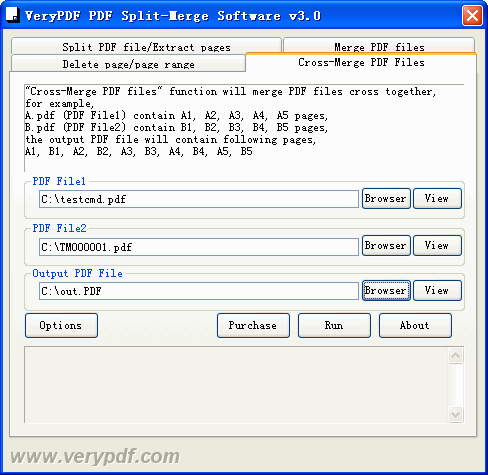
Support "Cross-Merge PDF files" function to
merge PDF files cross together;
3.Getting started
1.Demo version
PDF Split-Merge is a shareware, the trail version of PDF Split-Merge have 50
times limitation and a trial watermark in the created PDF files, after it
expired and if you want to continue to use it, you must purchase it.
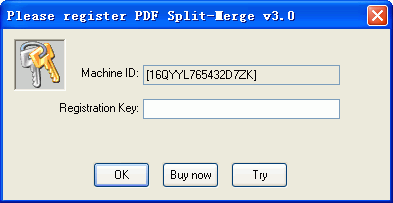
2.Demo version limitations
1. You can only use 50 times in the trial version;
2. A Red watermark in the created PDF files;
3.Basic functions
Split PDF file and extract pages from a PDF file, it can be splitted by page numbers,
by bookmarks, by even, odd or custom page ranges etc.,
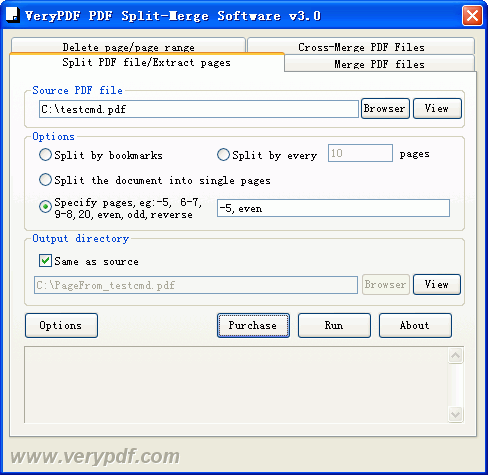
PDF Split-Merge allows operation of individual pages, page ranges and page sets, For example:
|
Pages |
Description |
| |
Leaving Pages field blank will split the document into single pages. |
| 2 |
Extract page number 2 into a new document. |
| 2,7 |
Extract pages 2 and 7 into a new document. |
| 1-9 |
Create a single output file containing pages 1 through
9. |
| 9-1 |
Create a single output file containing pages 1 through
9 in reverse order. |
| 8- |
Extract the page range from page 8 to the last page. |
| -8 |
Extract the page range from page 1 to the
8 page. |
| even |
Extract even pages. |
| odd |
Extract odd pages. |
| reverse |
Rearrange PDF pages by reverse order. |
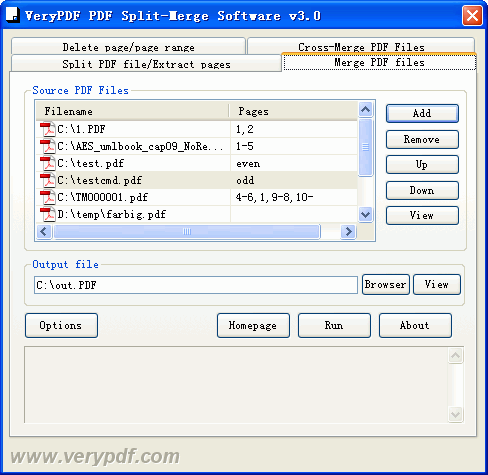
Merge PDF files,
you can specify page range for each PDF file that in the file list,
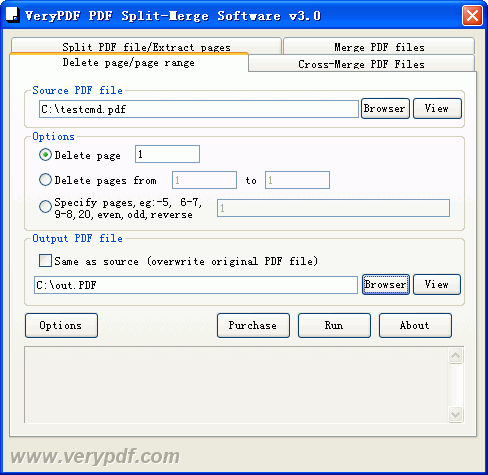
Delete page or page range from a PDF file,
Cross-Merge PDF files together,
4.Command Line options
To perform batch conversion or call conversion procedure from an automation script, you can use command line function in the
PDF Split-Merge software, You can either run this tool directly from command line or call it from any script as well. The program supports the following command-line options:
C:\>"C:\Program Files\VeryPDF PDF Split-Merge
v3.0\pdfpg.exe"
PDF Split-Merge software v3.0
Copyright (C)2003-2010 www.verypdf.com Inc
Web: http://www.verypdf.com
Email: support@verypdf.com
arguments : file1 [file2 ...] destfile
arguments : burst C:\input.pdf C:\output
arguments : set KeyName Value
------------------------------------
burst : burst PDF file to
PDF files, one page per PDF file
split <int> : split PDF file by every n pages
bookmark : split PDF file by bookmarks,
append page number to filenames
bookmark2 : split PDF file by bookmarks, without
page number in filenames
mergeform : merge two fillable PDF files together
crossmerge : cross merge two PDF files together with
compression
crossmerge2 : cross merge two PDF files together without
compression
getpagecount: retrieve page count from PDF file
addbookmark <int> : create bookmark to PDF file
addbookmark 1: use short filename as bookmarks
addbookmark 2: use full filename as bookmarks
addbookmark 3: use short filename without suffix as bookmarks
addbookmark 4: read bookmarks and filenames from txt file
set RetainBookmarks on/off: enable or disable bookmarks
set RetainAcroForms on/off: enable or disable AcroForms
------------------------------------
Examples:
pdfpg.exe C:\A.pdf,1,3 C:\merged.pdf
pdfpg.exe C:\A.pdf,-20,50 C:\merged.pdf
pdfpg.exe C:\A.pdf,1,3- C:\merged.pdf
pdfpg.exe C:\A.pdf,1,2,3 C:\B.pdf,5,2,9 C:\merged.pdf
pdfpg.exe C:\A.pdf,1,1-9 C:\B.pdf,5,2,9 C:\A.pdf,10 C:\merged.pdf
pdfpg.exe C:\A.pdf,even C:\merged.pdf
pdfpg.exe C:\A.pdf,odd C:\merged.pdf
pdfpg.exe C:\A.pdf,reverse C:\merged.pdf
pdfpg.exe C:\filelist.txt C:\merged.pdf
pdfpg.exe delete C:\A.pdf,1,3 C:\out.pdf
pdfpg.exe delete C:\A.pdf,-20,50 C:\out.pdf
pdfpg.exe delete C:\A.pdf,1,3- C:\out.pdf
pdfpg.exe delete C:\A.pdf,1,2,3 C:\out.pdf
pdfpg.exe delete C:\A.pdf,1,1-9 C:\out.pdf
pdfpg.exe delete C:\A.pdf,even C:\out.pdf
pdfpg.exe delete C:\A.pdf,odd C:\out.pdf
pdfpg.exe burst C:\A.pdf C:\split
pdfpg.exe split 2 C:\A.pdf C:\split
pdfpg.exe split 3 C:\A.pdf C:\split
pdfpg.exe bookmark C:\A.pdf C:\split
pdfpg.exe bookmark2 C:\A.pdf C:\
pdfpg.exe bookmark2 C:\A.pdf C:\out\
pdfpg.exe addbookmark 1 C:\A.pdf C:\B.pdf C:\out.pdf
pdfpg.exe addbookmark 2 C:\A.pdf C:\B.pdf C:\out.pdf
pdfpg.exe addbookmark 3 C:\A.pdf C:\B.pdf C:\out.pdf
pdfpg.exe addbookmark 3 C:\filelist.txt C:\out.pdf
pdfpg.exe addbookmark 4 C:\filelist.txt C:\out.pdf
pdfpg.exe mergeform C:\form1.pdf C:\form2.pdf C:\out.pdf
pdfpg.exe crossmerge C:\test1.pdf C:\test2.pdf C:\out.pdf
pdfpg.exe crossmerge2 C:\test1.pdf C:\test2.pdf C:\out.pdf
pdfpg.exe getpagecount C:\A.pdf
pdfpg.exe set RetainBookmarks on
pdfpg.exe set RetainBookmarks off
pdfpg.exe set RetainAcroForms on
pdfpg.exe set RetainAcroForms off
pdfpg.exe set RegCode "XXXXXXXXXXXXXXXXX"
5. Technical Support
If you have any technical questions, suggests, bug reports, please contact us (
support.verypdf.com )
|
 VeryPDF Cloud OCR API
Web to PDF Converter Cloud API
HTML to Image Converter Cloud API
Free Online PDF Toolbox
VeryPDF Cloud OCR API
Web to PDF Converter Cloud API
HTML to Image Converter Cloud API
Free Online PDF Toolbox  Free Online Advanced PDF Converter
Free Online PDF Compressor
Free Online PDF Splitter
Free Online DOCX to DOC Converter
Free Online Word to PDF Editor
Free Online ShareFile
Free Online RSS Feed to Email
Free Online Advanced PDF Converter
Free Online PDF Compressor
Free Online PDF Splitter
Free Online DOCX to DOC Converter
Free Online Word to PDF Editor
Free Online ShareFile
Free Online RSS Feed to Email
 Knowledge Base
 Submit a Ticket
 Send an Email
 Custom Solutions
 Support Options
 Contact Us