VeryPDF PDFPrint Command Line User Manual
VeryPDF PDFPrint
Command Line can be used to print existing PDF documents to any printer
device that is accessible through the Windows operating system. PDFPrint Command
Line supports command line operation, it can be easily embedded into your
applications and print PDF files quickly. VeryPDF PDFPrint Command Line does NOT
need Adobe Acrobat or free Acrobat Reader software.
VeryPDF PDFPrint Command Line application
can be called from within ASP, VB, VC, Delphi, BCB,
Java, .NET and COM+ etc. program languages. It uses
advanced techniques to allow efficient asynchronous
multithreaded operations.
Evaluate PDFPrint
with virtual printers
You can print to docPrint
or docPrint PDF Driver
virtual printers for test and debug purposes, save the papers.
C:\>pdfprint.exe
VeryPDF PDFPrint v2.0
Web: http://www.verypdf.com
Email: support@verypdf.com
Build: Jun 14 2007
-------------------------------------------------------
Description:
Print PDF files to physical printer.
Note:
1. Paper size can be selected either standard papers or user defined papers.
   Look at following page for the standard papers:
   /artprint/document-converter/index.htm
-------------------------------------------------------
Usage: pdfprint.exe [options] [Options] <PDF Files>
  -firstpage <int>   : first page to print, from 1 to max page
  -lastpage <int>    : last page to print, from 1 to max page
  -prompt            : prompt the user with the print dialog so they can
    change printer settings and/or select pages manually
  -printer <string>  : printer name to print
  -copies <int>      : copies to print
  -paper <string>    : paper size to printer
    pdf    : retrieve paper size from PDF file
    number : standard paper size
    others : user defined paper size, such as "612x792pt", "11x17in", "215.9x279.4mm", etc.
  -scalex <int> : X axis scale factors, default is 100
    100 : do not scale PDF page
      0 : scale the width of PDF page to fit the printer's paper size
     -1 : keep the minimum constant scaling in both paper width and height
  -scaley <int> : Y axis scale factors, default is 100
    100 : do not scale PDF page
      0 : scale the height of PDF page to fit the printer's paper size
     -1 : keep the minimum constant scaling in both paper width and height
  -pdforient <int>   : select the orientation of the show PDF page,
    0 : upright, default
    1 : upside down
    2 : left side down
    3 : right side down
  -orient <int>      : select the orientation of the printer paper,
    1 is portrait (default) and 2 is landscape
  -duplex <int>      : select duplex or double-sided printing for printers
    capable of duplex printing,
    1 : simplex
    2 : horizontal
    3 : vertical
  -color <int>       : switches between color and monochrome on color printers,
    1 : monochrome
    2 : color
  -xres <int>        : specify the printer x-resolution,
    -4    : high
    -3    : medium
    -2    : low
    -1    : draft
    number: the number of dots per inch (DPI) and is therefore device dependent
  -yres <int>        : specify the printer y-resolution, same as -xres
  -xoffset <int>     : specify a page offset in the horizontal axis
  -yoffset <int>     : specify a page offset in the vertical axis
  -collate <int>     : specify whether collation should be used when printing
    multiple copies, 0 is disable and 1 is enable
  -scale <int>       : specify the factor by which the printed output is to
    be scaled, The apparent page size is scaled from the physical page size
    by a factor of scale/100.
  -shell             : Call default PDF viewer to print PDF file
  -shell2            : Call default PDF viewer to print PDF file
  -shelltime <int>   : set timeout for shell printing
  -raster            : raster printing, convert PDF page to raster picture before printing
  -preproc           : preprocess PDF file before printing, useful for some damaged PDF files
  -printtofile <string>: save print spooling data to a disk file
  -mergeprintjobs    : combine all print jobs into one print job
  -listprinter       : list printers in system
  -listbins          : list bins/trays of a printer
  -chgbin <int>      : change bin/tray to printer
  -wtext <string>    : watermark on printed document
  -wtype <int>       : type of watermark
    0 : normal watermark
    1 : watermark on header
    2 : watermark on footer
  -wf <string>       : font name of watermark
  -wh <int>          : font height of watermark
  -ww <int>          : font width of watermark
  -wb                : specify bold font
  -wi                : specify an italic font
  -wu                : specify an underlined font
  -ws                : specify a strikeout font
  -wo <int>          : opacity of watermark, from 0 to 100
  -wa <int>          : angle of watermark
  -wc <string>       : color of watermark,
    FF0000: Red color
    00FF00: Green color
    0000FF: Blue color
    HexNum: Other colors
  -wx <int>          : X offset of watermark
  -wy <int>          : Y offset of watermark
  -$ <string>        : Input registration key
Example:
   pdfprint.exe -printer "PDFcamp Printer" -copies 3 -paper 9 C:\input.pdf
   pdfprint.exe -printer "PDFcamp Printer" -paper "pdf" C:\input.pdf
   pdfprint.exe -printer "PDFcamp Printer" -paper "11x17in" C:\input.pdf
   pdfprint.exe -printer "PDFcamp Printer" -paper "215.9x279.4mm" C:\input.pdf
   pdfprint.exe -printer "PDFcamp Printer" -paper "612x792pt" C:\input.pdf
   pdfprint.exe -printer "docPrint" -paper "612x792pt" -orient 1 C:\input.pdf
   pdfprint.exe -printer "docPrint" -paper "612x792pt" -orient 2 C:\input.pdf
   pdfprint.exe -printer "docPrint" -paper "11x14in" -pdforient 3 C:\input.pdf
   pdfprint.exe -printer "docPrint" -firstpage 1 -lastpage 1 C:\input.pdf
   pdfprint.exe -prompt C:\input.pdf
   pdfprint.exe -scalex 50 -scaley 50 C:\input.pdf
   pdfprint.exe -scalex 0 -scaley 0 C:\input.pdf
   pdfprint.exe -scalex -1 -scaley -1 C:\input.pdf
   pdfprint.exe -duplex 3 C:\input.pdf
   pdfprint.exe -color 1 C:\input.pdf
   pdfprint.exe -xres 600 -yres 600 C:\input.pdf
   pdfprint.exe -xres -4 C:\input.pdf
   pdfprint.exe -xoffset 200 -yoffset 200 C:\input.pdf
   pdfprint.exe -scale 50 C:\input.pdf
   pdfprint.exe -shell -shelltime 5000 C:\input.pdf
   pdfprint.exe -raster C:\input.pdf
   pdfprint.exe -preproc C:\input.pdf
   pdfprint.exe -mergeprintjobs -copies 3 C:\input.pdf
   pdfprint.exe -mergeprintjobs C:\*.pdf
   pdfprint.exe -mergeprintjobs C:\test*.pdf
   pdfprint.exe -mergeprintjobs C:\files.txt
   pdfprint.exe C:\files.txt
   pdfprint.exe -printtofile C:\out.pcl -printer "HP LaserJet 4550 PCL" C:\input.pdf
   pdfprint.exe -listprinter
   pdfprint.exe -listbins -printer "docPrint"
   pdfprint.exe -chgbin 15 -printer "docPrint" C:\input.pdf

Watermark options during printing:
   pdfprint.exe -wtext "Watermark" C:\input.pdf
   pdfprint.exe -wtext "Watermark" -wtype 1 C:\input.pdf
   pdfprint.exe -wtext "Watermark" -wf "Arial" C:\input.pdf
   pdfprint.exe -wtext "Watermark" -wh 200 C:\input.pdf
   pdfprint.exe -wtext "Watermark" -wb -wi -wu -ws C:\input.pdf
   pdfprint.exe -wtext "Watermark" -wo 80 C:\input.pdf
   pdfprint.exe -wtext "Watermark" -wo 80 -wa 75 C:\input.pdf
   pdfprint.exe -wtext "Watermark" -wc "FF0000" C:\input.pdf
   pdfprint.exe -wtext "Watermark" -wc "00FF00" C:\input.pdf
   pdfprint.exe -wtext "Watermark" -wc "0000FF" C:\input.pdf
   pdfprint.exe -wtext "Watermark" -wx 100 -wy 100 C:\input.pdf

C:\>
Download VeryPDF PDFPrint Command Line
product,
Download
Purchase VeryPDF HTML Converter Command Line product,
Purchase
Screen Shots:
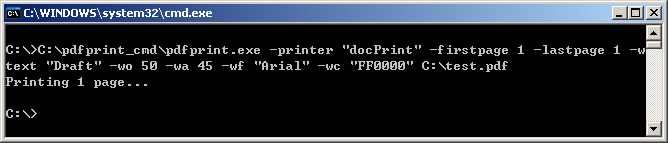
Run "pdfprint.exe" command line in command line
window,
pdfprint.exe -printer "docPrint" -firstpage 1 -lastpage 1 -wtext "Draft" -wo 50
-wa 45 -wf "Arial" -wc "0000FF" C:\test.pdf
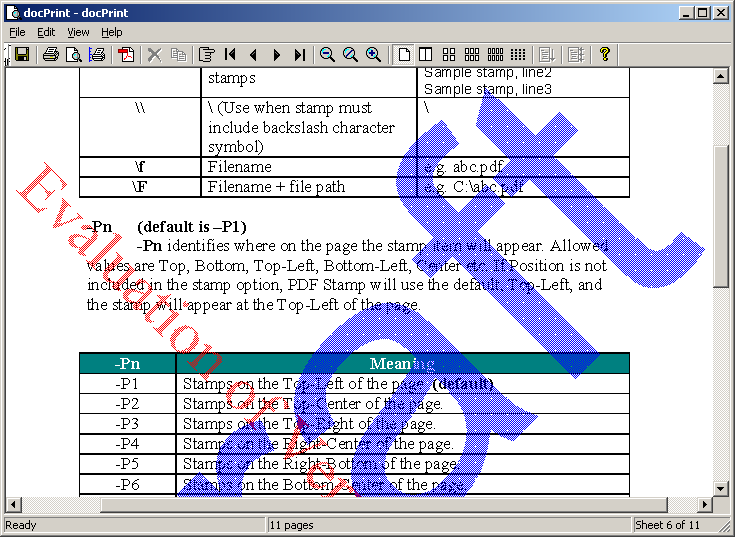
You will see a print preview in the docPrint
preview application,
See Also:
PDFcamp Printer (PDF
Writer)
PDFcamp Printer (PDF writer) is the quick and easy PDF creation software that
converts any type of printable Windows document, including DOC, XLS, PPT, TXT
and even HTML, to a universally accepted PDF (Portable Document Format) file
with the click of a button.
Metafile/RTF/Image To
PDF Command Line
Convert Windows
Metafile (EMF, WMF), RTF and Image formats to
Vector and Raster PDF files directly, it doesn't
depend on Printer Drivers.
Document Converter Professional (docPrint
Pro)
docPrint Document Converter Professional is a software product that dynamically
converts MS Office 97/2000/XP/2003, WordPerfect, HTML, AutoCAD DWG, PostScript,
EPS, PDF, MS Visio and many other document types to PDF, PostScript, EPS, JPEG,
TIFF, PNG, PCX and BMP etc formats. It works in both GUI version and Command
Line version. With docPrint Document Converter Professional you can convert your
documents from and to PDF, EPS, PS, JPEG, TIFF, BMP, PCX, PNG files easily. (See
user manual)
PDF To Image Converter
PDF To Image Converter is an application program based on Windows platform,
which can directly convert PDF files to dozens of image formats, such as TIF,
TIFF, JPG, GIF, PNG, BMP, EMF, PCX, TGA and so on.
Contact:
support@verypdf.com
/
 VeryPDF Cloud OCR API
Web to PDF Converter Cloud API
HTML to Image Converter Cloud API
Free Online PDF Toolbox
VeryPDF Cloud OCR API
Web to PDF Converter Cloud API
HTML to Image Converter Cloud API
Free Online PDF Toolbox  Free Online Advanced PDF Converter
Free Online PDF Compressor
Free Online PDF Splitter
Free Online DOCX to DOC Converter
Free Online Word to PDF Editor
Free Online ShareFile
Free Online RSS Feed to Email
Free Online Advanced PDF Converter
Free Online PDF Compressor
Free Online PDF Splitter
Free Online DOCX to DOC Converter
Free Online Word to PDF Editor
Free Online ShareFile
Free Online RSS Feed to Email
 Knowledge Base
 Submit a Ticket
 Send an Email
 Custom Solutions
 Support Options
 Contact Us